Showing posts with label SEO. Show all posts

Policy Announcement and Compliance improves website's Traffic

It might not be too late to wake up to the fact that stage is set where SEO, the term hackneyed enough to mean optimization for traffic through anything on the web, has a lot to do with Policies set by different channels which must be followed to get better exposure.

You can easily break it broadly into Google, Bing, Facebook & twitter. Some may add yandex, yahoo, linkedin and perhaps reddit too. All have different policies with something in common, widely recognized as User Experience, UX.

However, user experience designing on search may be a different ball game compared to what it is on social media, where a lot depends on the context when you release the content. So, its a tricky affair actually. Also, too much meta marking for social media may adversely affect search result.

Hence, to maintain edge you must position yourself better where others are ignorant. Policy compliance is such an area. If your site is up to date in terms of latest policies laid down by different search engines and social media it gives you an edge.

These are:
compliance to

  • Privacy Policy

  • internet cookies policy

  • content ownership & sharing policy

  • Comment Publishing Policy

  • Law of the land policy

  • Social accountability policy

  • Content Removal Policy

  • Did some of the policies discussed in the end looked bizarre? Well, you should not take them as such because the era in which we are living google, facebook... are trigger happy blocking the inflammatory content which lacks social accountability and whenever escalations take place their bot filters would be happy to detect and give you green signal. Make the list bigger and announce them emphatically. It works!

    Read This >>

    5 Powerful HTML Tags for content SEO of Website or blog!

    Following Tags will help Your Content catch the attention of Search Engines, in a Faster and Better way:
    1. Heading Tags, <h>

      You can use headings like h1, h2..... h6 to tell what the contents are. There should be a hierarchy. If your blog is using h1 for blog header, h2 for post header, consistently throughout the blog, search engines can understand what are blog, post headings and subheadings. I use, h1 for Blog heading, h2 for Post Heading, h3 for post subheading, h4 for comment heading and h5 for sidebar heading. Most Important are h1, h2 & h3 which if nested properly gets indexed by search engines. 

    2. Paragraph tag, <p>

      Paragraphs wrapped in <p>....</p> are good for seo. It is considered the most important tags wrapping texts. Since, most texts on web are wrapped within this tag, search engines look out for them. You must use them in all your posts, to mark the paragraph, start and end.

    3. Emphasis <em> & Strong <strong>

      Many people don't know, <u>...</u> and <b>....</b> are obsolete tags. Use <em>...</em> to emphasize some text & <strong>.....</strong> to make it appear bold. The text within these tags are given due weightage by Search bots.

    4. Use of Section Tag, <section>

      There has been great debate on its usage. There are more Don'ts than Do's. Important point to remember are, it should have an embedded <h> tag, and content shouldn't be meant for syndication. As per my understanding, it is meant for article's bullet points in a box or table of content or some standalone information embedded within an article which might be of interest and importance to the reader, but are not meant for syndication. A kind of extra information not to be confused with main article body. It is meant for telling the search bots that the piece of information is, though related to the article is not its part. Use it in that way. 

    5.  Theme Break <hr>

      This horizontal rule tag is of historical importance for applying horizontal styling, but now, it has acquired a new meaning. It means theme break! Whenever, you apply <hr>...</hr> or self closing, <hr/>, it means the content after and before are of two different themes. What is of interest to search engines here is that, they may start sniffing of themes and information around them. It has been learnt its usage brings indexing enhancements. 

    Read This >>

    Breadcrumb with Navigation for More Pageviews

    Breadcrumbs are trails of webpages in a website that you have browsed, shown mostly on the top of the pages for better back and forth navigation.
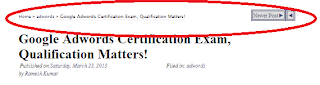
    Breadcrumb_Blogpost_webpage
    Breadcrumb with Post Navigation

    In blogger we use Labels as Breadcrumb, which though are not true breadcrumb, we just show the crosss linkage of pages across Labels. Since, labels themselves may no be cross linked, it is advised to show only one of them, to avoid any possible penalty.

    Here, I would be giving you a code which not only shows breadcrumb on your blog post but also, has an embedded Newer post, older Post Navigation on the top, that sits seamlessly on the top of your blogger post. Check this post for Live Demo, and play with it to learn how it functions.


    First, add the following code into the CSS of your blogger template:

    .breadcrumbs{border-bottom:1px solid #E7E7E7;
    font: 8px "Lucida Sans Unicode","Lucida Grande",sans-serif;}.charfix {
     font-size:130%; line-height:0; } 


    Then find the below code in your template,

    <b:include data='top' name='status-message'/>

    Immediately above that paste this code:

    <b:include data='posts' name='breadcrumb'/>

    Now Find, the Following code in your template:

    <b:includable id='main' var='top'>


    There may be two places of the above code. If it occurs once, paste the below code (Modified form of Anish's Code) just above it. If twice, then paste below code above second one:

    <b:includable id='breadcrumb' var='posts'>
    <b:if cond='data:blog.homepageUrl != data:blog.url'>
    <b:if cond='data:blog.pageType == &quot;static_page&quot;'>
    <div class='breadcrumbs'><span><a expr:href='data:blog.homepageUrl' rel='tag'>Home</a></span> &#187; <span><data:blog.pageName/></span></div>
    <b:else/>
    <b:if cond='data:blog.pageType == &quot;item&quot;'>
    <!-- breadcrumb for the post page -->
    <b:loop values='data:posts' var='post'>
    <b:if cond='data:post.labels'>
    <div style='display:inline'><span class='breadcrumbs' xmlns:v='http://rdf.data-vocabulary.org/#'>
    <span typeof='v:Breadcrumb'><a expr:href='data:blog.homepageUrl' property='v:title' rel='v:url'>Home</a></span>
    <b:loop values='data:post.labels' var='label'>
    <b:if cond='data:label.isLast == &quot;true&quot;'>
     &#187; <span typeof='v:Breadcrumb'><a expr:href='data:label.url' property='v:title' rel='v:url'><data:label.name/></a></span>
    </b:if>
    </b:loop>
     &#187; <span><data:post.title/></span>
        </span><b:if cond='data:newerPageUrl'><b:if cond='data:olderPageUrl'>
        
          <a class='blog-pager-older-link' expr:href='data:olderPageUrl' expr:id='data:widget.instanceId + &quot;_blog-pager-older-link&quot;' expr:title='data:olderPageTitle'><span id='blog-pager-older-link'><span class='Charfix'>&#9668;</span>  </span></a>
        
        </b:if>
        
          <a class='blog-pager-newer-link' expr:href='data:newerPageUrl' expr:id='data:widget.instanceId + &quot;_blog-pager-newer-link&quot;' expr:title='data:newerPageTitle'><span id='blog-pager-newer-link' style='float:right'><data:newerPageTitle/><span class='Charfix'>&#9658;</span>  </span> </a>
         </b:if></div>
    <b:else/>
    <div class='breadcrumbs'><span><a expr:href='data:blog.homepageUrl' rel='tag'>Home</a></span> &#187; <span>Unlabelled</span> &#187; <span><data:post.title/></span></div>
    </b:if>
    </b:loop>
    <b:else/>
    <b:if cond='data:blog.pageType == &quot;archive&quot;'>
    <!-- breadcrumb for the label archive page and search pages.. -->
    <div class='breadcrumbs'>
    <span><a expr:href='data:blog.homepageUrl'>Home</a></span> &#187; <span>Archives for <data:blog.pageName/></span>
    </div>
    <b:else/>
    <b:if cond='data:blog.pageType == &quot;index&quot;'>
    <div class='breadcrumbs'>
    <b:if cond='data:blog.pageName == &quot;&quot;'>
    <span><a expr:href='data:blog.homepageUrl'>Home</a></span> &#187; <span>All posts</span>
    <b:else/>
    <span><a expr:href='data:blog.homepageUrl'>Home</a></span> &#187; <span>Posts filed under <data:blog.pageName/></span>
    </b:if>
    </div>
    </b:if>
    </b:if>
    </b:if>
    </b:if>
    </b:if>
    </b:includable>
    

    Save it, and again add or overwrite the existing CSS for the New Post, old post link, preferably through Add CSS feature of your blog:

    #blog-pager-older-link, #blog-pager-newer-link, #home-link{background:#DDDDDD; border:double;padding:1px;display:inline-block;font-size:9px;}
    

    Save, the template & check, how it looks like on post pages. You will find something like, one shown in the image of this blog.


    (Note, This blogpost may not show the Navigation, till it is the newest post. For Checking how it functions and live demo, check an older post)
    Read This >>

    Blog SEO 2013 – Optimize All the Signals You send to Search Engines

    Search Engines’ frequent algorithm changes have inculcated us to look for many new signals that are either proven or are suspected to impact SEO of your website. Some of which you might have experienced in your webpage rankings.
    1. Content Originality Signal

      Use of original content in your website is paramount for your SEO success. Particularly, Google is capable of judging the originality of the content and help the most original content rise up.  Avoid borrowed sentences, phrases or dubious paraphrasing. Google can detect!
    2. Author Reputation Signal

      Who is the writer and in which field she commands readership, determines the weightage. Tell the Search Engines, who you are, by linking to all important Social Media profiles, on the webpage. Use the (unofficial) tag   “rel=me” to tell them it is you, and let them determine your authority vis a vis the subject. This tag really helps!
    3. Social Sharing Signal

      How much the content has been shared on the social media platforms like, twitter, google plus, facebook, linkedin etc., matters in ranking of your website. Optimize the website and content for sharing. More Share & Participation means Better Rank!
    4. Genuine Anchor text Signal

      All the anchor texts used in linking should match the context. Avoid using same or similar texts as anchor at different places, they count nothing. Better, diversify the content of the anchor text, if you can’t do more justice to the link.
    5. Your Nick Signal

      This is observed by many, yet some confirmation from Gurus is due. Search Engines have learnt how you are referred to in comments and forums. So, if someone talks about “netargument”, “SEOmoz” search engines can detect without any need of hyperlink to whom they are referring to, and they give them due credit. Incredible! Get an original & unique nick so that you are not deprived of this credit because of confusion.
    6. Quality Link Signal

      You must send signals to the Search Engines that you have external links on quality websites. All Natural Looking Content and context counts. If you want to get rid of some inferior websites that links to you, use google’s Disavow Tool inside Webmaster Tools, to tell them you don’t want them to count those links.
    Read This >>

    Blogger internal link development, for better SEO and rank–Make your post rank higher!

    For those who are unaware of how links matter in ranking on Google I will first brief how linking impacts SERP. Links are one of the most important factor which decides how your page will rank on Google. If you get a link from a page which already ranks higher in SERP, Google treats it as a vote, and your site too start ranking well for the keyword term and gets a strong boost on related terms. This is 1st link. If you don’t get first link, try getting links from pages which links to already well ranking websites, this is second link. It goes on and you get benefits in decreasing order depending on kind of link you get. Google respects your link depending on the subject of the post, site and its niche.

    Good for you if some well ranking website has linked to your posts. However, you may also leverage your own website’s pages which ranks well and it does not reduce the benefits in anyway.

    If you have been reading this blog for a long time you might have noticed I sometimes give you 3-5 reading suggestions in the end of posts. They are for SEO reasons. They are of course good for enhancing pageviews too! Experimenting with the internal links on blog I have learnt some best practices for such kind of link building which I would be sharing with you in this blog post.

    1. First of all make a list of posts which are ranking well for some keywords and related ones you wish to target.
    2. Now use your own custom search engine powered by Google which looks into the content of your site only and search for terms there, like: adwords resellers, adwords certified etc.
    3. Now, copy the headlines from there only. This will ensure the searched terms are highlighted with bold or italicized tags! This step is important because, highlighted terms gives you extra thrust in ranking well & Google understands that they are more important than rest of the phrases.
    4. Now go the posts where you want to paste this link. The posts should be well ranking for a reasonably good period of time before you burden them with these new links. Paste the links in the bottom of the posts. Keep it limited to 3-5 posts only. 
    5. You should ensure that links and post content are related.
    6. Links which are posted together also signals to Google that they are somewhat related in content and deserves a better treatment, so What kind of links you paste there matters including the bundle you create there.

    For better understanding just read few posts which are using this technique, like:

    Read This >>

    Warning: Missing required field "updated" in Blogger Rich Snippet Webmaster Tool [Solved]

    missing required field updated blogger   Google Search

    While testing Rich Snippet for blogger posts in rich snippet testing tool inside Google Webmaster Tools, I found Warning:Missing required field “updated” problem.

    A lot of bloggers have advocated deleting hfeed and hentry fields to solve this problem. This indeed solves the problem, however, deleting a field whose function you don’t fully know may become the starting point of the unknown problems. So, I started exploring it further. Blogger gives you by default “published” timestamp field. A simple tweak of this gives the desired solution. Just find the following piece of code:

    <a class='timestamp-link' expr:href='data:post.url' rel='bookmark' title='permanent link'><abbr class='published' expr:title='data:post.timestampISO8601'><data:post.timestamp/></abbr></a>

    Copy it on a notepad and simply change the class value at two places, like this:
    <a class='updated' expr:href='data:post.url' rel='bookmark' title='permanent link'><abbr class='updated' expr:title='data:post.timestampISO8601'><data:post.timestamp/></abbr></a>

    Now put the above code inside a div with display setting to none, like this:
    <div style='display:none’><a class='updated' expr:href='data:post.url' rel='bookmark' title='permanent link'><abbr class='updated' expr:title='data:post.timestampISO8601'><data:post.timestamp/></abbr></a></div>.

    Put the above code anywhere in the body part of the template, maybe just below the “published” field. Save the template and now test again inside the rich snippet tool in Webmaster tools. Warning is Gone!

    P.S.----> On 15th of March, 2012, Google updated its Rich snippet guidelines and has mentioned anything inside a “display:none” won’t be considered. So, you should find a place to show it to the readers of the blog too, and remove the <div style=’display:none’> from above including the closing </div> for rich snippet to work properly.

    NOTE: – Since, so many people are facing problem implementing it, I am giving you the code which you can simply copy and paste. If you have author & timestamp on the top, use this code in footer just like me and if you have default code in footer, use it on the top below the headline. This code will end all your trouble regarding, rich snippet. Just copy & paste. Wish you good luck!
    <a expr:href='data:post.authorProfileUrl' rel='author' title='author profile'>
                            <span class='post-author vcard' itemprop='name'>
            <b:if cond='data:top.showAuthor'>
              <data:top.authorLabel/>
              <span class='fn'><data:post.author/></span>
            </b:if>
          </span>
                          </a><a class='updated' expr:href='data:post.url' rel='bookmark' title='permanent link'><abbr class='updated' expr:title='data:post.timestampISO8601'> <data:post.timestamp/></abbr></a>

    Note 2:--- To determine the position of the code, simply look for <data:post.body/>. This code actually is Your Blog Post. If you post any code above it, it will appear above your blogpost. If you post below it, it will appear below the post body. In addition you have default footer-1, footer-2….. in your template. You may choose any position. Hope this information will help you in determining where to show the “updated field code”. Just keep in mind the aesthetic value of the blog.


    Recommended:

    1. Simplified Schema formatting of content for Search Rich Snippet & Adwords
    2. 10 important things to do immediately after starting a BlogSpot blog
    3. 10 Ways to Quickly reduce the Bounce Rate on Landing Page
    Read This >>

    Multiple Presence on the same Page - It enhances your Conversion Rate Many Times Over!

    Once upon a time People thought, since they have good SEO, and presence on quality keywords they don't need Adwords. Some used to think just the reverse, and perhaps still thinks so, that since they have a good running Adwords campaign, they don't need to SEO their website. Just check your stats and focus on adwords stats where, you had presence both in Organic and paid links. You would notice, you had wonderful conversion rate both in organic and paid. Why this happens? Not only it increases your percentage of links on the page over others, it increases the level of trust of visitors in you. People think since you are also present in the paid link despite being present in organic link, you are the person worth doing business with. Google now offers you three opportunities to feature on the same search page. They are 1) organic Listing, 2) Paid Listing, and 3) Local business listing.  Don't discount any of them. If you are running a hotel, or selling flowers or any kind of business, where google offers all three kind of listings, you cannot afford to go for a strategy around only one of them, because all your serious competitors are present there on all three, and  those who are not would soon be biting the dust, because whatever, single track strategy she is following, would become unprofitable sooner or later. What changed this game? There was a time when people used to advertise on keywords where they are not performing well in organic results. After sometime they found, if they advertise on same keyword where they have good presence organically too, they get great result. The practice started infecting other advertiser and this became an indication for user that what they see once is just a chance, what they see more than once is Genuineness. People want to deal with genuine people world around. Those who are present in all three listing in search get a big edge over those who are not. they see conversions flowing towards them while others would find, the keyword is getting costlier to afford every passing day! In industries where local listing matters the most like florist shops, hotels etc., you cannot afford to survive on a single listing on the page. 
    Similar is the case with content network. If you are also showing direct advertisements on the website alongwith the adwords ads on the page, it greatly enhances your conversion rate, compared to what you see with only one of them. Present strategy for online marketing should be domination. Try to dominate the placements as much as you can. Don't spread yourself too far and too thin. Choose the areas where you are strong and don't just give others the chance to take a slice away from you of your meal. If you know of a website where you find great number of prospects, just go and have a deal with them. Have your presence there both directly and indirectly through any third party targeting like google adwords, and just see the difference it creates in your returns on investments. 
    Read This >>

    Google shows Profiles in SERP - What it may mean?


    Last week Google added a new feature in SERP. When you search for the name of a person, you are likely to see some Google Profiles, at the end of the first page. Check the snapshot I have taken for Google search - Ramesh Kumar, which shows my profile in the second row. Too see such kind of results:
    • You should be signed in to a Google account
    • You should have created your Google Profile, either via gmail or through any other Google services.
    All over the world SEOs are alarmed over this development. Is Google going towards Authority based ranking in SERPs. Earlier, Matt Cutts had given signal that Page Rank based ranking system might get substituted with a new system. This comment was followed by non inclusion of Page Rank indicator in google chrome web browser. Page Rank a pathbreaking advancement in search technology has been the most targeted thing among SEOs. However, since its launch, its secrets have been demistyfied by intelligent web reasearchers, and even a third rate SEO now knows it is based on inbound links. This algorithm gave rise to cat and mouse game between Google and SEOs. One side SEOs descovering the new algorithmic tweak and trying to manipulate, and on the other side, Google trying to catch the manipulators by adding some patches to this algorithm. People have gone to the extent of saying that this algorithm has given rise to spammy link building and launch of crap websites throughout the internet, to fecilitate link building. Page Rank algorithm has many loopholes, and over the time period we cannot assume it to deliver same high quality results as it used to when launched.

    From the recent changes in the SERP, it looks like Google may give authoritative ranking a preference over, Page rank or at least authority might carry weightage. Let us wait till smoke gets cleared of this situation. However, if it comes out to be true, then SEOs may be running after some internet authorities to gain position in SERPs. Not an easy task though!

    Read This >>

    How to own a Keyword on Google

    Sounds interesting? Everybody wants to own a keyword on google. You go for SEO - white hat, black hat and what not. Still google refuses to give you. It won't give you a single place in SERP, till you qualify as the most worthy fit in that slot. Fortunately, there is a way out of this situation. Google allows you to own a keyword if you give it a keyword! Attempt it strategically. When I was searching for a domain name in fashion category, I analyzed all related words like, fashion, fad, style, trend etc. Google trend result showed search volume is in this order, Style, trend, fashion, fad decreasing. Style, fashion and trend related domains were taken. Luckily, I got Stylefad.com! A combination of two words Style & Fad. One having highest search volume the other having the lowest. A good deal, isn't it? There is so much of competition for style related queries and so little for fad related one. The phrase style fad has a promising future too. Search query against it is increasing every day. After two months 6 out of 10 results talk about this website. In that way i am leading the growing tribe of this niche by creating content for them. The website would surely beat everyone else in terms of relevancy, links, and any other factor Google may apply. There is definite advantage of being a leader in search segment. Google rewards you, definitely. I was the first person to shoot a blog on - online political campaigns india, and I still dominate there, because I was present there even when others were not even thinking about it. After that I consistently shot subsequent blogs on this issue. I started being referred by others too!

    So, to own a keyword on google, innovate it, propagate it, saturate it and rule. You may apply the strategy. Good Luck!
    Read This >>